Small Business Accounting Software: How to Choose One Your Accountant Will Thank You For
Bank feeds, invoicing, sales tax and reporting — what to compare when choosing accounting software, how to involve your accountant, and how to migrate without losing your history.
Key takeaways
- Ask your accountant which systems they support before you choose — it saves fees later.
- Bank feeds and good matching rules matter more than fancy dashboards.
- Check sales tax / VAT support for every place you sell.
- Close your books monthly; software makes it faster, not automatic.
Accounting software is the backbone of your business's financial picture. Choose well and month-end takes an hour; choose poorly and you pay your accountant to clean up a mess every quarter. The good news: modern cloud accounting tools are mature, and the decision mostly comes down to fit.
Start with your accountant
The single most useful step is to ask your accountant or bookkeeper: "Which accounting systems do you work with most efficiently?" Accountants often have deep experience with one or two platforms, partner pricing, and templates. Choosing a system they don't know can mean higher fees and slower answers.
If you don't have an accountant yet, ask a few local firms what they recommend for businesses like yours. Their answer tells you what's standard in your country and industry.
What accounting software should handle
| Function | What good looks like |
|---|---|
| Bank and card feeds | Automatic daily import from all business accounts; rules that categorize repeat transactions |
| Invoicing | Branded invoices, online payment links, automatic reminders |
| Bills and expenses | Capture receipts by photo or email; schedule payments |
| Sales tax / VAT / GST | Correct rates for where you sell; filing-ready reports |
| Reporting | Profit & loss, balance sheet, cash flow, aged receivables and payables |
| Multi-currency | If you buy or sell in more than one currency |
| Integrations | Payroll, e-commerce, payments, POS and CRM |
| User roles | Separate access for staff, bookkeeper and accountant |
Common options include QuickBooks Online, Xero, Zoho Books, FreshBooks, Sage and Wave, with regional leaders in many countries. Some are stronger in particular markets — another reason to ask local professionals.
Questions that separate the options
- Does it support your country's tax rules and filing requirements? Some countries require specific e-invoicing formats or certified software.
- How good are the bank feeds for your banks? Ask for a trial and connect your actual accounts.
- Inventory: do you need to track stock quantities and cost of goods sold? Basic inventory is available in many tools, but complex inventory may need a dedicated system.
- Projects or job costing: service businesses and contractors often need profit by project or job.
- E-commerce: if you sell online, how does it summarize daily sales, fees and refunds from your store and payment processor?
- Users and pricing: how many users are included, and does your accountant get free access?
Pricing structure
Most cloud accounting platforms charge a monthly subscription by tier. Tiers typically differ by number of users, invoices or bills per month, multi-currency, inventory, project tracking and advanced reporting. Payroll is usually an add-on. Online payments through invoices carry processing fees per transaction.
Choose the tier that fits your needs today with room for a year of growth. Upgrading later is usually easy; downgrading can be harder if you rely on a feature.
Migrating without losing your history
- Pick a clean start date, ideally the beginning of your financial year or a quarter.
- Bring opening balances for every account (bank, receivables, payables, loans) as of that date — your accountant should prepare these.
- Import customers, suppliers, products and open invoices.
- Keep read-only access to the old system or export full reports for the historical period.
- Run both systems in parallel for one month if the business is complex.
Make it a management tool, not just a tax tool
Software only helps if the books are current. A simple monthly routine keeps them useful:
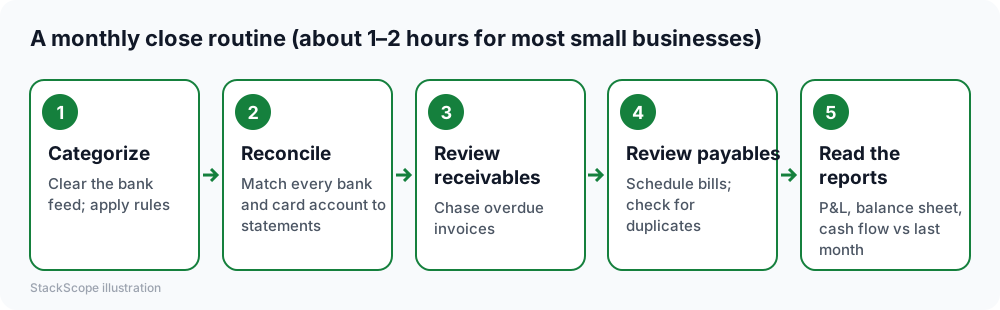
Once the books are reliable each month, you can answer real questions quickly: Which products or services are most profitable? Is cash going to be tight in two months? Which customers pay late?
Common mistakes
- Mixing personal and business transactions. Use separate accounts and cards.
- Letting the bank feed pile up for months, then guessing categories.
- Too many categories. Keep the chart of accounts simple and agreed with your accountant.
- Ignoring receivables. Turn on automatic invoice reminders; they're one of the highest-return features.
- No backup of key reports. Export year-end reports and keep them with your records.
Worked example: a landscaping business
Imagine a hypothetical landscaping company with three crews, using a desktop accounting program that only the owner's spouse knows how to use, and handing a box of receipts to the accountant each year.
Decision. Their accountant works mostly with two cloud systems; they choose the one with strong job costing so they can see profit per contract.
Setup. At the start of the financial year, the accountant prepares opening balances. Bank and card feeds are connected, rules auto-categorize fuel, equipment and supplier bills, and receipts are captured by phone photo.
Invoicing. Invoices now go out from the job site the day work is completed, with a pay-now link and automatic reminders.
Result after a quarter. The monthly close takes about an hour. Job-cost reports show that two maintenance contracts lose money after equipment and travel are counted — and the business renegotiates them. The year-end handover to the accountant is a login, not a box of paper.
Frequently asked questions
Can I do my own bookkeeping with software? Many owners handle day-to-day categorization themselves and use an accountant for review, tax returns and advice. Software makes that division of work practical.
Do I need inventory software too? If you have many products, multiple locations or manufacture goods, a dedicated inventory system that syncs with accounting is often better than accounting software's basic inventory.
Is free accounting software good enough? Free tools can work for very simple businesses. Check limits on bank feeds, users and support, and whether your accountant is happy to work with it.
The bottom line
Choose a system your accountant supports and that handles your local tax rules, connect all bank feeds, keep the chart of accounts simple, and close the books monthly. That's what turns accounting software from a tax chore into a picture of how your business is doing.