Invoicing and Online Payments: How to Get Paid Faster Without Paying Too Much in Fees
How to choose invoicing software and payment processors, compare fees fairly, set up automatic reminders, and reduce late payments and payment fraud.
Key takeaways
- Adding a 'Pay now' link to invoices is one of the simplest ways to get paid faster.
- Compare payment fees on your real mix of transactions, not on the headline rate.
- Automatic reminders before and after the due date reduce awkward chasing.
- Verify any change to your own or a supplier's bank details by phone.
Cash flow problems in small businesses often aren't about sales — they're about collections. Work is done, invoices are sent, and then money arrives weeks late. The right invoicing and payment setup shortens that gap, reduces admin and, if chosen carefully, doesn't eat too much of your margin in fees.
Where invoicing should live
You have three common options:
| Option | Pros | Cons |
|---|---|---|
| Your accounting software's invoicing | Invoices and payments flow straight into your books | Design and payment options may be basic |
| Payment provider invoicing (e.g. Stripe, Square, PayPal) | Fast setup; strong payment options | Needs syncing to your accounting software |
| Industry tools (field service, agencies, clinics) | Invoices tied to jobs, appointments or projects | Another system to integrate |
For most small businesses, invoicing inside the accounting system with an integrated payment provider is the cleanest setup: one place for receivables, automatic reconciliation and fewer errors. See our accounting software guide.
Make paying easy
The single most effective change is adding a "Pay now" link to every invoice, letting customers pay by card, digital wallet or bank transfer in a couple of clicks. Also:
- State payment terms clearly (e.g. "Due in 14 days") and the exact due date.
- Offer the methods your customers prefer. Businesses often prefer bank transfer for large amounts; consumers prefer cards and wallets.
- Use deposits for large projects and recurring billing for ongoing services.
- Send invoices promptly — the day the work is completed, not at month-end.
Understanding payment fees
Payment processors typically charge a percentage plus a fixed fee per transaction for cards, with different rates for international cards, currency conversion, manually keyed cards and instant payouts. Bank transfers and direct debits are usually much cheaper, sometimes capped.
To compare providers fairly:
- Take your last three months of transactions.
- Split them by type: domestic card, international card, bank transfer, in-person.
- Apply each provider's published rates to that mix.
- Add monthly fees, chargeback fees and payout fees.
The provider with the lowest headline rate isn't always cheapest for your mix. Some businesses pass card fees to customers where local law allows; check rules in your jurisdiction and with your card networks before adding surcharges.
Automate reminders
Most invoicing tools can send reminders automatically. A polite, consistent schedule removes the awkwardness of chasing and gets results.
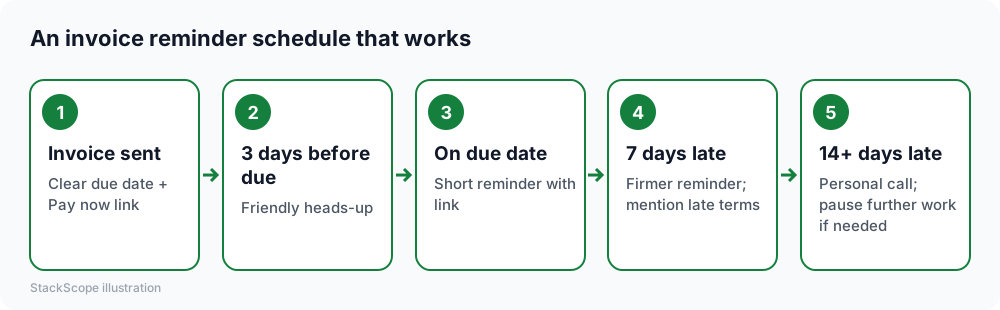
Keep messages short, include the amount, due date and payment link, and thank customers who pay on time.
Reduce late payments further
- Check new customers before extending large credit: ask for references or require a deposit.
- Offer a small early-payment discount if your margins allow; it can be cheaper than a loan.
- Agree on late-payment terms in your contract before work starts.
- Make it someone's job to review aged receivables weekly.
Protect against payment fraud
Invoice fraud is one of the most common scams targeting small businesses:
- Supplier bank-change scams: a fraudster, often using a compromised or look-alike email account, says a supplier's bank details have changed. Always confirm changes by phone using a number you already have.
- Fake invoices for services you never ordered — match every bill to a purchase or contract.
- Customers receiving fake invoices that appear to be from you. Tell customers your bank details will never change by email alone, and protect your email with MFA.
Evaluation checklist
- Pay-now links with the payment methods your customers use
- Automatic reminders you can customize
- Recurring invoices and deposits
- Multi-currency if you bill internationally
- Correct tax handling and any required local invoice formats
- Automatic sync and reconciliation with accounting
- Clear, published fee schedule and payout timing
- Customer portal where clients can see and pay all open invoices
Worked example: a small IT services firm
Imagine a hypothetical IT support company invoicing about 60 business clients monthly by PDF attachment, with bank transfer as the only option. On average, invoices are paid well after the due date.
Changes. Invoices move into the accounting system with a pay-now link offering card and bank transfer. Recurring support contracts are billed automatically on the first of each month. Reminders go out three days before the due date, on the due date and seven days after.
Fees. Analysis shows that most clients choose bank transfer for large invoices and card for small ones, so the added card fees are modest compared with the cash-flow benefit.
Fraud check. A note on every invoice states that bank details will never change by email alone.
Result. Average days to payment drop significantly, and the owner no longer spends Friday afternoons writing awkward chase emails.
Frequently asked questions
Should I let customers pay by card even though it costs more? Often yes: faster payment and fewer late invoices can outweigh the fee. For large invoices, encourage bank transfer.
What's a chargeback? A customer disputes a card payment with their bank, which can reverse the payment and add a fee. Clear descriptions, delivery evidence and good communication reduce chargebacks.
Are e-invoicing rules relevant to me? Many countries are introducing mandatory electronic invoicing formats, especially for business-to-business sales. Ask your accountant and choose software that supports your country's requirements.
The bottom line
Invoice immediately, add a pay-now link, automate polite reminders, compare fees on your real transaction mix, and verify every bank-detail change by phone. Those habits shorten the time between finishing the work and having the cash.