E-commerce Platforms Compared: Hosted, Open-Source or Marketplace?
Choosing where to sell online affects your fees, flexibility and workload for years. A practical comparison of hosted platforms, WordPress/WooCommerce and marketplaces — and how to estimate your true cost per order.
Key takeaways
- Hosted platforms trade some flexibility for far less maintenance.
- Open-source options like WooCommerce give control but make you responsible for hosting, updates and security.
- Calculate total cost per order: subscription + payment fees + apps + transaction fees.
- Make sure you can export products, customers and orders before you commit.
Picking an e-commerce platform is one of the stickiest software decisions a small business makes. Moving later is possible, but it means migrating products, customers, order history, URLs and integrations. So it pays to think through the trade-offs carefully.
The three main routes
| Route | Examples | Best for | Trade-offs |
|---|---|---|---|
| Hosted (SaaS) platforms | Shopify, BigCommerce, Squarespace Commerce, Wix eCommerce | Most small businesses that want to sell quickly with little maintenance | Monthly fees; app costs; less control over code |
| Open-source / self-hosted | WooCommerce (WordPress), PrestaShop, Magento Open Source | Businesses with technical help that need customization or already run WordPress | You handle hosting, updates, security and backups |
| Marketplaces | Amazon, Etsy, eBay, Mercado Libre, regional marketplaces | Reaching existing buyers fast | Higher commissions; you don't own the customer relationship |
Many successful small businesses combine routes: an own store for brand and margins, plus one or two marketplaces for reach.
Hosted platforms
Hosted platforms handle servers, security patches, uptime and checkout compliance. You choose a theme, add products and connect payments. The catch is the app economy: features like product reviews, subscriptions, advanced shipping rules or B2B pricing are often paid add-ons, and monthly app costs can exceed the platform subscription.
WooCommerce and other open-source options
WooCommerce turns a WordPress site into a store. The software is free; you pay for hosting, premium plugins and someone's time to maintain it. It's attractive if you already have a WordPress site with valuable content, need unusual functionality, or want full control of your data. The responsibilities are real, though: plugin updates, conflicts, performance tuning, backups and security. Budget for them honestly.
Marketplaces
Marketplaces bring traffic you'd otherwise have to buy, but you pay for it through referral fees, listing fees and sometimes advertising. You also have limited access to customer data and must follow the marketplace's rules, which can change. Treat them as a sales channel, not your only home.
Estimate your true cost per order
Headline subscription prices are misleading. Build a simple model:
- Monthly subscription ÷ expected orders per month.
- Payment processing fees (percentage + fixed fee per transaction).
- Platform transaction fees if you use a third-party payment provider on some platforms.
- Apps/plugins ÷ orders.
- Theme, hosting and developer time amortized over a year.
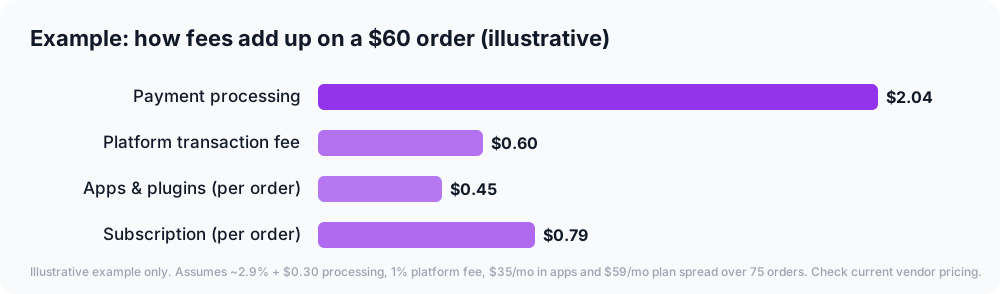
Compare that cost per order across your shortlist at your current volume and at twice your volume.
Features to check for your business
- Payment methods your customers expect (cards, wallets, local methods, buy-now-pay-later)
- Multi-currency and multi-language if you sell internationally
- Tax calculation for the regions you sell to
- Shipping rates, label printing and carrier integrations
- Inventory across locations or channels (store, marketplace, physical shop)
- Product variants and bundles that match your catalog
- Integration with your accounting software and email marketing
- SEO basics: editable URLs, titles, meta descriptions, redirects
- Export of products, customers and orders in standard formats
Performance and conversion basics
Whatever platform you choose, a few basics matter more than the platform itself:
- Fast, mobile-friendly pages — most shoppers browse on phones.
- Clear product photos and descriptions with sizes, materials and real use cases.
- Visible shipping costs and delivery times early, not at the last step.
- Trust signals: contact details, return policy, secure checkout, genuine reviews.
- Simple checkout with guest checkout and popular wallets.
Migrating platforms
If you're moving from one platform to another:
- Export and import products, customers and orders (most platforms offer migration tools or apps).
- Redirect old URLs to new ones to keep search rankings.
- Recreate email automations and integrations.
- Run a full test order for each payment and shipping method before switching DNS.
Worked example: a handmade jewelry brand
Imagine a hypothetical maker selling about 150 orders a month, mostly on a craft marketplace, who wants better margins and more control over the brand.
Model. They compare marketplace fees on their real orders with a hosted store's subscription, payment fees and the four apps they'd need (reviews, product personalization, shipping labels and email). At their volume, the hosted store is cheaper per order — but only if it brings in its own traffic.
Plan. They keep the marketplace shop for discovery and launch their own store for repeat customers, with a welcome discount for email subscribers and packaging inserts pointing buyers to the website.
Execution. Product photos and descriptions are rewritten with sizes, materials and care instructions. A test order is run for every shipping method before launch.
Result. Over six months, a growing share of repeat orders moves to the brand's own store, where margins are higher and the business owns the customer relationship.
Frequently asked questions
Which platform is cheapest? It depends on volume and the features you need. A low subscription can be offset by transaction fees or expensive apps. Model cost per order.
Can I start on a marketplace and add my own store later? Yes, many brands do. Collect customer emails where the marketplace rules allow, and build your brand so customers search for you directly.
Do I need a developer? Not for a standard hosted store. You may need help for custom themes, integrations or a self-hosted platform.
The bottom line
Choose hosted if you want to focus on selling, open-source if you need control and have technical support, and marketplaces for reach. Whatever you pick, calculate your true cost per order, check the features your customers need, and confirm you can take your data with you.