Website Builders vs. WordPress vs. Hiring an Agency: A Small Business Decision Guide
How to decide between a drag-and-drop website builder, WordPress and a custom build — based on budget, who will maintain it, SEO needs and how much the site needs to do.

Key takeaways
- Decide first who will update the site every month — that answer often decides the platform.
- Website builders are the fastest path to a professional site with little maintenance.
- WordPress offers flexibility but needs updates, backups and security care.
- Own your domain in your own registrar account, whatever platform you choose.
Your website is often the first place a customer checks whether you're legitimate. It needs to load fast, look professional on a phone, explain what you do and make it easy to get in touch or buy. The platform behind it matters less than most people think — but choosing badly can leave you with a site nobody can update.
Start with the maintenance question
Before comparing platforms, answer: Who will update this site every month, and how comfortable are they with technology? Updating opening hours, adding a product, publishing a post and fixing a typo should take minutes, not a developer invoice.
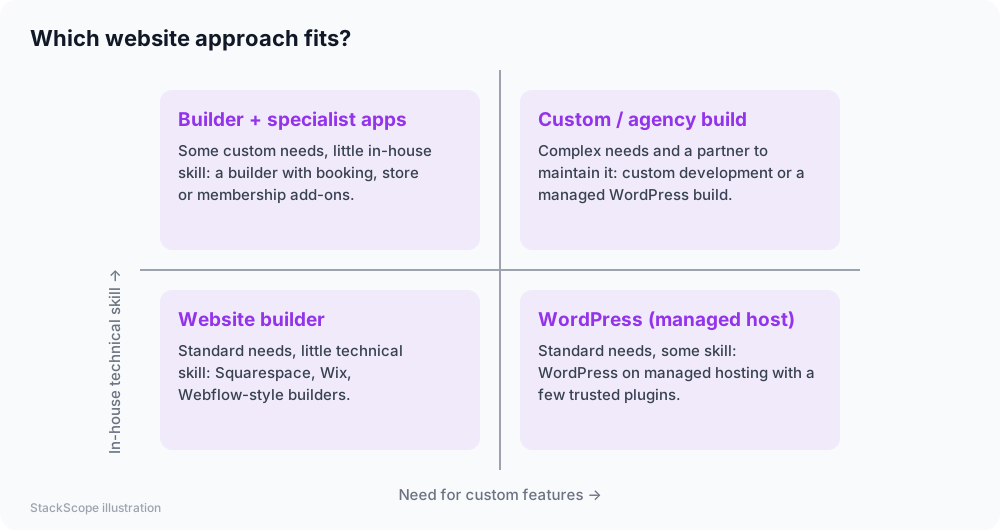
The options
| Option | Upfront cost | Ongoing effort | Flexibility | Best for |
|---|---|---|---|---|
| Website builder (e.g. Squarespace, Wix, Webflow, Shopify for stores) | Low | Low — hosting and security handled | Medium | Most small businesses, portfolios, local services |
| WordPress on managed hosting | Low to medium | Medium — updates, plugins, backups | High | Content-heavy sites, blogs, businesses with some technical help |
| Agency or custom build | Medium to high | Depends on the contract | Very high | Complex functionality, integrations, strong brand requirements |
| Static site (hand-coded or generated) | Low to medium | Low hosting effort, but edits need technical skill | High | Technical owners; fast, secure sites |
What every small business site needs
- A clear headline saying what you do, for whom and where
- Contact options above the fold on mobile: phone, WhatsApp or chat, form
- Services or products with prices or "starting from" ranges where possible
- Proof: genuine reviews, project photos, client logos (with permission)
- About page with real people and your story
- Location, hours and service area for local businesses
- Privacy policy and, if you use tracking or ads, a cookie notice where required
- Fast loading on mobile and HTTPS
SEO basics that matter more than the platform
All major platforms can rank well in search engines when the basics are right:
- Useful, original content that answers your customers' real questions.
- One clear topic per page with a descriptive title and meta description.
- Readable URLs and logical navigation.
- Fast pages — compress images and avoid heavy effects.
- A Google Business Profile for local businesses, consistent with your site's address and phone.
- Internal links between related pages.
Search engines reward pages that help people. Thin pages created only to target keywords rarely perform well for long.
Costs to plan for
- Domain name — yearly renewal.
- Platform or hosting — monthly or yearly.
- Premium theme or template — optional one-time cost.
- Apps or plugins — booking, forms, reviews, SEO tools.
- Professional email — usually a separate subscription (Google Workspace, Microsoft 365).
- Photography and copywriting — often the best investment for conversions.
- Maintenance — your time or a provider's retainer.
Own your digital assets
Whatever route you choose:
- Register the domain in an account you control, with MFA, not in the agency's or a former employee's account.
- Keep admin access to the website platform, analytics and Google Business Profile.
- Get a copy of your content and design files.
- Document logins in your company password manager.
Losing control of a domain is one of the most painful — and avoidable — problems small businesses face.
Working with an agency or freelancer
If you hire help, ask for:
- A fixed scope with the number of pages, features and revision rounds.
- Which platform they'll use and whether you can update it yourself.
- Who owns the design, code and content after payment.
- Maintenance terms: updates, backups, security, and response times.
- Training — a short recorded session on making common updates.
Common mistakes
- Choosing a platform nobody on the team can edit.
- Launching without analytics or without a way to track inquiries.
- Stock photos everywhere — real photos build more trust.
- Hiding contact details in a footer.
- Too many plugins on WordPress, slowing the site and creating security risks.
Worked example: a family-run plumbing company
Consider a hypothetical plumbing business whose old website was built by a nephew years ago on a platform nobody can log into anymore.
The deciding question. The office manager will make updates. She isn't technical, so they choose a website builder rather than WordPress.
Content. One page per core service (emergency repairs, water heaters, bathroom renovations), each with a clear price-from range, real job photos, the service area and a prominent call/WhatsApp button. Genuine reviews are shown with permission. An FAQ answers questions customers actually ask on the phone.
Ownership. The domain is transferred to a registrar account the owner controls, with MFA. The Google Business Profile is claimed and its details matched to the website.
Result. The site loads quickly on phones, the office manager updates opening hours and seasonal offers herself, and calls from the website can finally be tracked.
Frequently asked questions
Is WordPress better for SEO than website builders? Not inherently. Content quality, speed and structure matter far more than the platform. WordPress offers more SEO plugins and flexibility, which helps on large content sites.
How long does it take to build a small business website? A simple builder site can be live in a few days if content is ready. Content — text and photos — is usually the slowest part.
Can I switch platforms later? Yes, but plan for redesign work and URL redirects to protect your search rankings.
The bottom line
Choose based on who will maintain the site, cover the essentials every customer looks for, follow SEO basics with genuinely useful content, and always keep ownership of your domain and accounts.