Online Scheduling and Booking Software: Cut the Back-and-Forth and the No-Shows
How appointment-based businesses and busy teams can choose booking software: calendar sync, deposits, reminders, staff scheduling and the settings that reduce no-shows.

Key takeaways
- Booking links remove the 'what time works for you?' email chain.
- Two-way calendar sync is non-negotiable to prevent double bookings.
- Automatic reminders by email and SMS/WhatsApp reduce no-shows; deposits reduce them further.
- Add buffers and daily limits so the tool protects your time, not just fills it.
If your business runs on appointments — consultations, sales demos, classes, repairs, beauty services, clinics — every minute spent arranging times by phone or email is a minute not spent with customers. Online scheduling software lets customers book themselves into your real availability, 24 hours a day, and sends reminders so they actually show up.
Two families of scheduling tools
| Type | Built for | Examples of the category |
|---|---|---|
| Meeting schedulers | Sales calls, consultations, interviews, internal meetings | Calendly, Microsoft Bookings, Google Calendar appointment schedules, Cal.com, Zoho Bookings |
| Service booking systems | Salons, studios, clinics, tutors, field services with staff, resources and payments | Square Appointments, Acuity Scheduling, SimplyBook.me, Fresha, Mindbody, Setmore |
Meeting schedulers focus on calendar availability and video links. Service booking systems add staff schedules, rooms or equipment, packages, memberships, point-of-sale and client records.
Must-have features
- Two-way sync with the calendars your team uses (Google, Microsoft, Apple)
- Buffers before and after appointments, plus minimum notice and daily limits
- Automatic confirmations and reminders by email, and SMS or WhatsApp where supported
- Self-service reschedule and cancel links, with a cancellation window
- Time-zone handling if you book clients in other regions
- Intake questions on the booking form
- Embeddable widget or link for your website, Google Business Profile and social profiles
- Payment or deposit collection at booking, if appointments are valuable
For teams, add round-robin or pooled availability (book whoever is free), individual staff calendars and permissions so staff manage their own schedules.
Reducing no-shows
No-shows are expensive: an empty slot can't be resold. The most effective tactics combine friction-free rescheduling with a small commitment.
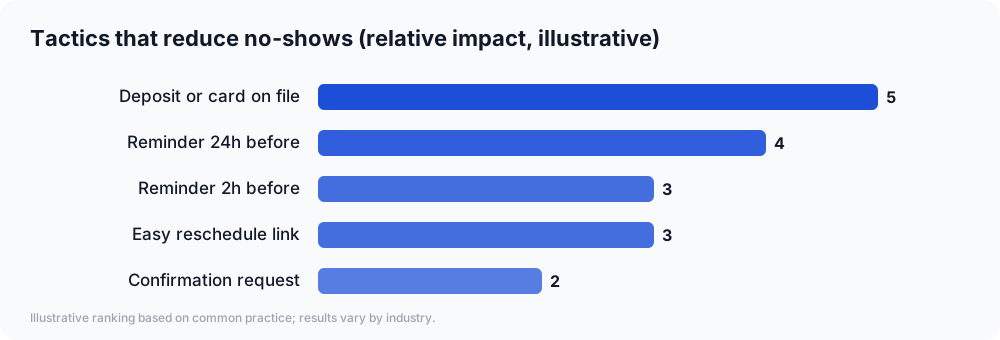
- Send two reminders: one the day before and one a couple of hours before.
- Make rescheduling easy. Customers who can move an appointment in two clicks are less likely to simply not turn up.
- Take deposits or a card on file for high-value or long appointments, with a clear cancellation policy.
- Ask for confirmation for appointments booked far in advance.
- Keep a waitlist to fill late cancellations, if your tool supports it.
Protect your time
Booking tools can fill your calendar too efficiently. Configure them to work for you:
- Buffers for travel, preparation and notes.
- Daily caps on certain appointment types.
- Minimum notice (e.g. no bookings less than 4 hours ahead).
- Booking windows (e.g. no more than 60 days out).
- Different availability for different services — demos in the morning, consultations in the afternoon.
Integrations worth checking
- Video conferencing: automatic Zoom, Google Meet or Teams links.
- CRM: create or update contacts and log meetings.
- Payments: card, wallet or local payment methods.
- Accounting or POS: for service businesses that charge at booking.
- Messaging: SMS or WhatsApp reminders, often billed per message.
Pricing
Meeting schedulers typically offer a free plan with one event type and charge per user for more. Service booking systems often charge per staff member or location, with extra fees for SMS reminders and payment processing. Model the total cost with your number of staff and monthly appointments.
Privacy and data
Booking forms collect personal data. Only ask for what you need, explain how it's used, and be especially careful in health, legal or financial services, where intake details may be sensitive and regulated. Check where the vendor stores data and whether it offers the agreements your industry requires.
Common mistakes
- Not connecting every calendar, leading to double bookings.
- Offering every slot instead of protecting focus time.
- Long booking forms that make people abandon.
- Forgetting time zones on links shared internationally.
Worked example: a physiotherapy clinic
Imagine a hypothetical clinic with four practitioners and two treatment rooms, taking bookings by phone and losing revenue to no-shows.
Setup. They choose a service booking system with staff calendars, room resources and deposits. Initial assessments require a small deposit; follow-ups don't. Reminders go out by email two days before and by SMS two hours before, each with a reschedule link.
Protecting time. Each practitioner has a 10-minute buffer between sessions and a blocked admin hour daily. Same-day online bookings close two hours in advance.
Privacy. The intake form asks only for contact details and the reason for the visit; clinical history is collected in the clinic's records system, not the booking tool.
Result. Phone calls for routine bookings drop sharply, no-shows fall, and late cancellations are often filled from the waitlist.
Frequently asked questions
Will customers actually book online? Most customers appreciate it, especially outside business hours. Keep phone booking available for those who prefer it.
Can I charge a deposit legally? In most places, yes, if the policy is clear before booking. Check consumer rules in your region and state the refund terms plainly.
Do I need a separate booking tool if my website builder has one? Built-in booking can be enough for simple needs. Choose a dedicated tool when you need staff scheduling, deposits, packages or deeper integrations.
The bottom line
Pick a meeting scheduler for calls and consultations, or a service booking system for staff-and-resource businesses. Sync every calendar, automate reminders, offer easy rescheduling, add deposits for valuable appointments, and configure buffers so the tool protects your time.