Help Desk Software: When a Shared Inbox Stops Working and What to Choose Next
The signs you've outgrown a shared support inbox, the features that matter in help desk software, and how to set up tickets, SLAs and a knowledge base without over-engineering it.
Key takeaways
- Move to a help desk when messages get missed, duplicated or answered inconsistently.
- Bring every channel — email, chat, WhatsApp, social — into one queue.
- Start with five tags, two priorities and a simple response-time target.
- A small knowledge base reduces repeat questions and powers AI answers later.
Most small businesses start customer support with a shared inbox like support@ or info@. It works — until it doesn't. Two people answer the same email, an angry customer waits three days because everyone assumed someone else replied, and nobody can say how many complaints came in last month.
Help desk software solves those problems by turning each conversation into a ticket with an owner, a status and a history.
Signs you've outgrown a shared inbox
- Messages are missed or answered twice.
- Customers write on several channels (email, website chat, WhatsApp, Instagram) and replies are scattered.
- You can't tell how long customers wait for an answer.
- New staff struggle because answers live in people's heads.
- You want to know why customers contact you, so you can fix root causes.
Core features to look for
| Feature | What it does |
|---|---|
| Omnichannel inbox | Email, chat, social and messaging apps in one queue |
| Assignment and collision detection | Clear owner per ticket; warns if two agents reply at once |
| Saved replies / macros | Consistent answers to common questions in one click |
| Tags, priorities and views | Organize and filter work |
| SLA / response-time targets | Alerts when tickets are about to breach your target |
| Knowledge base | Public help articles customers can search |
| Customer context | Order history or CRM data alongside the ticket |
| Reporting | Volume, response time, resolution time, satisfaction |
| AI features | Suggested replies, summaries, automatic tagging, AI agents |
Common options include Zendesk, Freshdesk, Help Scout, Zoho Desk, Gorgias (for e-commerce), Front and HubSpot Service Hub. Several offer free or low-cost plans for very small teams.
Set it up simply
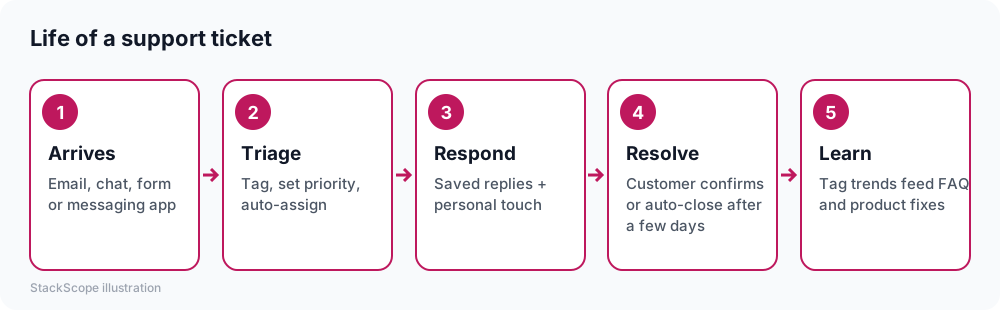
Channels. Connect your support email first, then add chat and messaging channels where customers already contact you. For many businesses, WhatsApp or Instagram messages are a major support channel — check native integrations.
Tags. Start with five or six: order status, returns, product question, billing, complaint, other. You can refine later based on what "other" contains.
Priorities. Two levels are enough at first: normal and urgent. Define "urgent" clearly (payment problems, safety issues, an angry customer threatening to cancel).
Targets. Choose a first-response target you can meet, such as "within 4 business hours," and display it to customers. Meeting a modest promise builds more trust than missing an ambitious one.
Saved replies. Write templates for your top 10 questions, with placeholders for names and details. Encourage agents to personalize the first line.
Build a small knowledge base
Ten clear help articles answering your most common questions can noticeably reduce ticket volume. Link them from your website footer, order confirmation emails and auto-replies. A good knowledge base also becomes the source material for AI support agents — see our guide to AI chatbots for customer service.
Pricing
Help desks are mostly priced per agent per month, with higher tiers adding automation, SLAs, multiple brands and advanced reporting. AI features may be included, sold as add-ons per agent, or billed per AI resolution. Check:
- Whether light agents or collaborators (people who only add internal notes) are free.
- Which channels are included at each tier.
- Messaging fees for WhatsApp and SMS, which are often passed through.
Metrics worth tracking
- First response time — how long customers wait for a first answer.
- Resolution time — how long until the issue is solved.
- Volume by tag — your list of things to fix in your product, website or policies.
- Customer satisfaction (CSAT) — a one-question survey after resolution.
Review these monthly. The goal isn't just faster replies; it's fewer reasons for customers to contact you at all.
Common mistakes
- Over-engineering: dozens of tags, complex routing rules and five priority levels for a team of three.
- Ignoring messaging channels, leaving WhatsApp conversations on someone's personal phone.
- Not closing the loop — tag trends that never reach the people who can fix the underlying issue.
- Hiding behind templates. Customers notice robotic replies; personalize the first line.
Worked example: a software reseller's support team
Consider a hypothetical team of three handling about 600 customer messages a month through a shared inbox, a website form and WhatsApp on one employee's phone.
Setup. They choose a help desk that connects email, web chat and WhatsApp Business into one queue. Six tags, two priorities and a promised first response within four business hours. The ten most common answers become saved replies.
Knowledge base. Eight help articles cover installation, licensing, renewals and refunds, linked from order confirmation emails.
Review. After the first month, reports show that "license activation" is the top tag. The team writes a clearer activation guide and adds it to the purchase email.
Result. Missed messages disappear, WhatsApp conversations are visible to the whole team, and activation-related tickets fall noticeably within two months — the clearest sign the help desk is reducing work, not just organizing it.
Frequently asked questions
Is a help desk worth it for a team of one or two? If volume is low and on one channel, a shared inbox may be enough. Once you have multiple channels or need history and reporting, even a free help desk plan helps.
Can the help desk replace our CRM? They overlap but serve different purposes. Help desks are built for conversations and issues; CRMs for pipeline and relationships. Many integrate so agents see customer data in both.
How long does setup take? A basic setup with email, a chat widget and saved replies can be done in a day. Knowledge base articles and automations can be added over the following weeks.
The bottom line
When the shared inbox starts dropping messages, move to a help desk that pulls every channel into one queue. Keep tags and priorities minimal, set a response target you can meet, write a small knowledge base, and use the reports to remove the reasons customers need to contact you.