Team Chat for Small Businesses: Slack, Teams, Google Chat or WhatsApp?
How to choose a team messaging tool, why running the business on personal WhatsApp groups is risky, and the simple channel rules that keep chat from taking over everyone's day.

Key takeaways
- If you already pay for Microsoft 365 or Google Workspace, start with the chat tool included.
- Business-owned chat matters: when someone leaves, company conversations should stay.
- A few channel conventions — naming, threads, response expectations — prevent chaos.
- Decisions belong in documents or tasks, not buried in chat history.
Team chat replaced internal email for most small businesses years ago. The question now is which tool — and how to stop it from becoming a constant stream of interruptions where important decisions get lost.
The main options
| Tool | Best fit | Watch out for |
|---|---|---|
| Microsoft Teams | Businesses on Microsoft 365; strong meetings and file integration | Can feel heavy; many settings |
| Google Chat | Businesses on Google Workspace; simple and included | Fewer third-party integrations than Slack |
| Slack | Teams that want the best integrations and polished chat experience | Paid tiers needed for full history and many features |
| WhatsApp / personal messaging | Very small teams, field staff, quick coordination | Business data on personal accounts; hard to offboard |
| Other options (e.g. Zoho Cliq, Discord, Mattermost) | Specific ecosystems or self-hosting needs | Smaller ecosystems |
Start with what you already pay for. If your business uses Microsoft 365 or Google Workspace, the included chat tool is often good enough and keeps identity, files and admin in one place. Choose Slack when integrations and user experience justify the additional cost.
The problem with running the business on personal WhatsApp groups
Many small businesses, especially those with field staff, coordinate through WhatsApp groups. It's convenient — everyone already has it — but it creates problems:
- Company information lives on personal phones and leaves when people leave.
- No admin control: you can't reliably remove access or preserve history.
- Mixing personal and work makes boundaries and privacy harder.
- Customer data shared in personal chats may conflict with privacy obligations.
If messaging apps are essential for your team, consider business-managed options (for example, business messaging tools with admin controls) and keep customer conversations in a proper help desk or CRM inbox.
Set up channels with intention
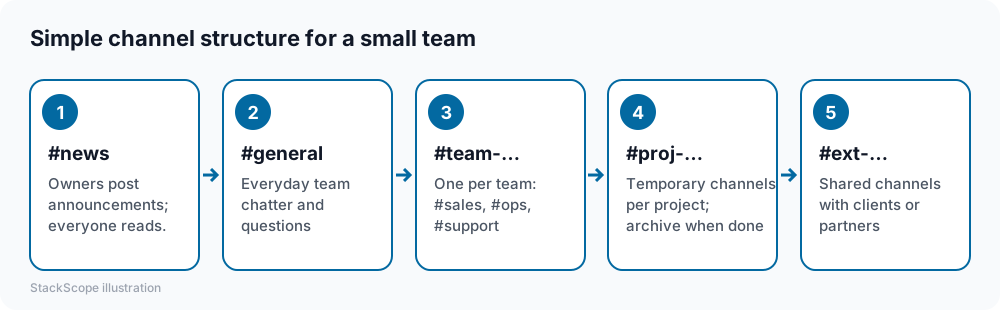
A few rules make chat dramatically more useful:
- Use threads for replies, so channels stay readable.
- Name channels consistently with prefixes so they're easy to find and archive.
- Default to public channels inside the company; private channels for genuinely sensitive topics.
- Agree on response expectations. Chat isn't email, but it isn't an emergency line either. For example: "Reply within the working day; call for urgent issues."
- Use status and notification schedules so people can focus and switch off after hours.
Where decisions should live
Chat is great for quick coordination and terrible as a system of record. When a decision is made in chat:
- Record it in the project management task, the document or the CRM record it affects.
- Link the chat thread if context helps.
- Pin key messages in the relevant channel.
Otherwise, six months later, nobody can find why something was decided.
Integrations worth adding
- Calendar: meeting reminders and status updates.
- Project management: notifications of assigned or overdue tasks.
- Help desk or CRM: alerts for urgent tickets or big deals — sparingly.
- File storage: preview and share documents.
Resist the urge to pipe every notification into chat. A channel full of bot messages gets muted.
Security and admin
- Enforce MFA through your identity provider.
- Remove departing employees the same day.
- Set retention policies that match your legal and business needs.
- Control guest and external access, especially shared channels with other companies.
- Be careful with apps and bots that request broad permissions.
Pricing
Chat included in Microsoft 365 or Google Workspace costs nothing extra. Slack and similar tools charge per active user per month, with free tiers limiting message history and integrations. Check how "active user" is defined — some vendors only bill for people who actually use the tool.
Worked example: a construction subcontractor
Consider a hypothetical subcontractor with an office team of five and twenty field workers coordinating through several personal WhatsApp groups.
Problem. When a site supervisor left, years of job photos and instructions went with his phone, and nobody could remove him from the groups he administered.
Solution. The company already pays for a productivity suite, so it moves internal coordination to the included chat tool. Each active job gets a channel; office staff and supervisors use a #announcements channel for schedule changes.
Field adoption. Workers install the mobile app on company-managed phones; photos and documents shared in job channels are stored in the company's file storage automatically.
Result. When people join or leave, access is added or removed centrally, job history stays with the business, and personal WhatsApp goes back to being personal.
Frequently asked questions
Can we use chat to talk with customers? Shared channels work well with close partners and agencies. For customer support, a help desk handles assignment, history and reporting better.
How do we reduce chat overload? Fewer channels, threads for replies, clear response expectations, notification schedules and moving decisions into documents.
Is email dead internally? Not entirely. Email still works for formal communication, external parties and anything that needs a durable record.
The bottom line
Use the chat tool that comes with your productivity suite unless another clearly earns its cost, keep company conversations on business-managed accounts, set simple channel and response rules, and move decisions out of chat into the systems where work lives.