AI Meeting Notetakers: Useful, Risky, or Both? A Guide for Small Teams
AI notetakers can transcribe, summarize and list action items automatically. How to choose one, get consent right, control where recordings go, and make summaries actually useful.
Key takeaways
- Always tell participants a meeting is being recorded or transcribed — and in many places you must get consent.
- Prefer notetakers built into the video tool you already use before adding a separate bot.
- Control auto-join and auto-share settings so summaries don't go to the wrong people.
- Use summaries as drafts: a human confirms action items and owners.
AI meeting notetakers promise to free everyone from taking notes: they join your call, transcribe every word, and email a tidy summary with action items afterwards. Many teams find them genuinely useful. Others discover that a bot has been joining meetings uninvited, recording sensitive conversations and sending summaries to external guests.
Here's how to get the benefit without the surprises.
What AI notetakers do
- Transcription of the conversation, often with speaker labels.
- Summaries of key points and decisions.
- Action items with suggested owners.
- Search across past meetings.
- Integrations that push notes to your CRM, project management or document tools.
They come in two forms: built into your video platform (Zoom, Google Meet, Microsoft Teams all offer AI summary features on certain plans) or standalone tools (such as Otter, Fireflies, Fathom, tl;dv and others) that join calls as a bot or record from your device.
Built-in or standalone?
| Built-in to video platform | Standalone notetaker | |
|---|---|---|
| Setup | Usually just a setting | Separate account; calendar connection |
| Works across platforms | Only that platform | Often Zoom, Meet and Teams |
| Data location | Stays with your existing vendor | Another vendor holds recordings |
| Features | Improving quickly; may be plan-dependent | Often richer search, CRM sync, coaching |
| Admin control | Managed with your existing admin console | Separate policies to configure |
If your team mostly uses one video platform, start with its built-in features. Consider a standalone tool when you need cross-platform coverage or specific integrations like CRM sync for sales calls.
Consent and the law
Recording laws vary. Some jurisdictions require only one party's consent; others require everyone's consent; data protection laws such as the GDPR add requirements about informing people and having a lawful basis. Customers and candidates may also simply feel uncomfortable.
Practical rules that work almost everywhere:
- Announce recording at the start and in the invite.
- Ask external participants before recording and respect a "no."
- Make the notetaker visible — don't use tools that record silently.
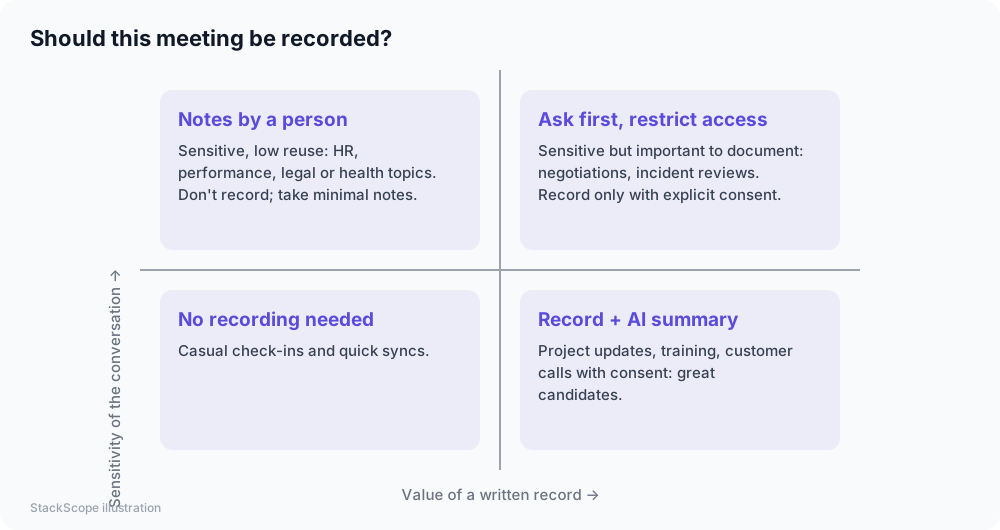
- Have a policy on which meetings are never recorded.
Settings to check before you roll it out
- Auto-join: many tools join every calendar event by default, including meetings you didn't intend to record. Turn this off or limit it to internal meetings.
- Auto-share: check who receives summaries automatically. Sending an internal discussion summary to an external guest is a common mistake.
- Retention: how long are recordings and transcripts stored? Can admins set limits?
- Training on your data: does the vendor use your recordings to train models? Business plans often exclude this; confirm in the terms.
- Access: who in your company can search everyone's meetings?
Making summaries useful
AI summaries are good drafts, not minutes of record.
- Confirm action items at the end of the meeting out loud: who does what by when.
- Correct names and numbers — transcription errors with names, prices and technical terms are common.
- Store summaries where work happens: the project, the CRM record or the client folder — not just in the notetaker's app.
- Use templates for recurring meeting types (sales discovery, weekly sync, client kickoff) so summaries follow a consistent structure.
Cost
Built-in features may be included in higher-tier video plans or sold as an AI add-on per user. Standalone notetakers are usually priced per user per month, with free tiers limited by minutes or meetings. As with other AI tools, buy seats for heavy users first.
Common mistakes
- Letting bots auto-join every meeting, including sensitive ones.
- Treating transcripts as accurate records without checking names and numbers.
- Collecting recordings forever with no retention policy.
- Different tools per person, scattering meeting history across vendors.
Worked example: a recruiting and HR consultancy
Consider a hypothetical consultancy of nine people running many internal meetings and client calls each week.
Policy. They enable the AI summary feature in their existing video platform for internal project meetings only. Client calls are recorded only with explicit consent at the start; candidate interviews and any HR conversations are never recorded.
Settings. Auto-join is disabled for external meetings, summaries are shared only with internal attendees, and recordings are deleted after 90 days unless saved to a client file.
Templates. A standard summary template captures decisions, risks and action items with owners. At the end of each meeting, someone reads the action items aloud to confirm them.
Result. Each consultant saves time on note-taking every week, project history becomes searchable, and the clear policy means clients are comfortable when asked for consent.
Frequently asked questions
Are AI notetakers accurate? Transcription quality is high for clear audio in major languages, but accents, crosstalk, poor microphones and jargon reduce accuracy. Summaries can miss nuance or misattribute decisions.
Can we use them for job interviews? Be cautious. Interviews involve personal data and fairness concerns. Inform candidates, get consent, and check local employment and privacy rules before recording.
Do they work for in-person meetings? Many tools offer mobile apps that record in the room. The same consent rules apply.
The bottom line
AI notetakers save real time on routine meetings. Start with your video platform's built-in tools, announce and get consent, lock down auto-join and auto-share settings, set retention limits, and treat summaries as drafts that a person confirms.