Password Managers for Small Teams: Setup, Sharing and Offboarding Done Right
A business password manager stops password reuse and makes sharing logins safe. What to look for, how to roll it out in a week, and how to handle employees leaving.
Key takeaways
- Use a business plan, not personal accounts — you need admin control and recovery.
- Organize shared logins into vaults or collections by team or client.
- Roll out in a week: admins first, then shared credentials, then everyone's work logins.
- Offboarding is where a password manager pays off: revoke access in minutes and rotate shared passwords.
If your team shares logins in a spreadsheet, a chat thread or on sticky notes, a password manager is the highest-impact security improvement you can make this month. It lets everyone use long, unique passwords without remembering them, and it lets you share access to accounts without exposing the passwords themselves.
Why personal password managers aren't enough
Many employees already use a password manager — often the one built into their browser or phone. That's better than nothing, but for business accounts you need:
- Company ownership of shared credentials, so they don't leave with an employee.
- Admin controls to add and remove people and enforce MFA.
- Account recovery if someone forgets their master password.
- Audit and health reports showing weak, reused or exposed passwords.
What to look for
| Feature | Why it matters |
|---|---|
| Shared vaults / collections | Group logins by team, department or client |
| Granular permissions | Let someone use a login without seeing or editing it, where supported |
| Admin recovery | Avoid permanent lockouts when people forget master passwords |
| MFA and SSO options | Protect the vault itself; SSO helps as you grow |
| Password health reports | Find weak, reused and breached passwords |
| Passkey support | Store and share passkeys as sites adopt them |
| Browser and mobile apps | Autofill everywhere people work |
| Secure notes and file storage | Wi-Fi keys, software licenses, recovery codes |
| Independent security audits | Evidence the vendor's encryption claims hold up |
Well-known business options include 1Password, Bitwarden, Keeper, Dashlane and NordPass, among others. Security design matters more than brand: look for end-to-end (zero-knowledge) encryption, published third-party audits and a transparent history of how the vendor has handled incidents.
How to organize vaults
Keep the structure simple:
- Company-wide: Wi-Fi, shared tools everyone uses.
- By team: Marketing (social accounts, ad platforms), Finance (banking read-only logins, accounting), Operations (suppliers, shipping portals).
- By client if you're an agency or service provider.
- Admin-only: domain registrar, DNS, email admin, website hosting, payment processors.
Personal work logins (an employee's own email, CRM seat) live in each person's private vault within the business account.
Rolling it out
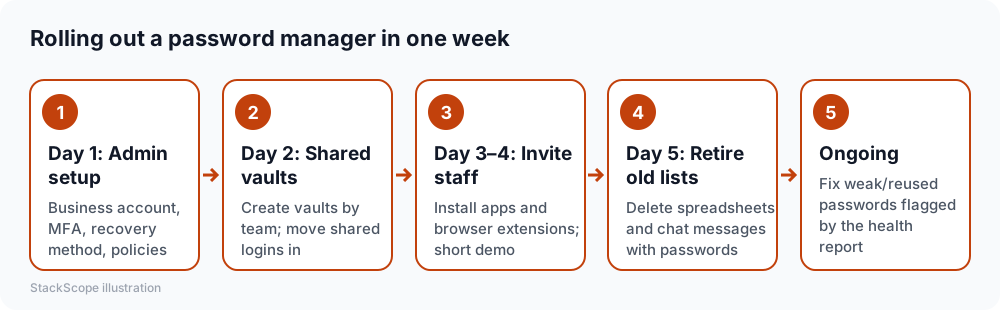
A few tips that make adoption stick:
- Install the browser extension during the demo, not later.
- Show one moment of convenience: autofill on a site they log into daily.
- Set a clear deadline after which shared passwords will only be available in the manager.
- Pair it with MFA. Store one-time codes in an authenticator app or the password manager, depending on your security policy.
Choosing a master password
The master password protects everything else, so it must be strong and memorable. A passphrase of several random, unrelated words is a good approach. Never reuse it anywhere else, and turn on MFA for the password manager account.
Offboarding: where the investment pays off
When someone leaves:
- Remove them from the password manager — their access to shared vaults ends immediately.
- Rotate passwords for sensitive shared accounts they could see (banking, admin, social media).
- Transfer ownership of anything in their vault that belongs to the business.
- Review the audit log for unusual exports or access before departure, if your plan offers it.
Without a password manager, step 2 alone can take days because nobody knows which accounts were shared.
Cost
Business password managers are typically priced per user per month, with team plans for small groups and business plans adding policies, SSO and reporting. Compared with the cost of a single compromised account, it's one of the cheapest security tools you'll buy.
Common mistakes
- Keeping the old spreadsheet "just in case." Delete it once migration is done.
- Sharing the master password of a single account among several people instead of using shared vaults.
- Skipping recovery setup, then losing access when the admin leaves.
- Not including admin-critical accounts like the domain registrar.
Worked example: a ten-person digital agency
Consider a hypothetical agency managing social media and ad accounts for 25 clients. Logins are kept in a shared spreadsheet and sent over chat when needed.
Structure. They create one vault per client, a company vault for internal tools and an admin-only vault for the domain registrar, email admin and banking. Account managers get access only to their clients' vaults.
Rollout. Admins set up the account and recovery on Monday; shared credentials move in on Tuesday; on Wednesday everyone installs the browser extension during a 20-minute session; on Friday the spreadsheet is deleted and chat messages containing passwords are removed.
Clean-up. The health report flags dozens of reused and weak passwords, which are changed over the following two weeks, and MFA is enabled wherever clients' platforms support it.
The payoff. When an account manager leaves three months later, their access to every client account is removed in minutes, and the most sensitive shared passwords are rotated the same afternoon.
Frequently asked questions
Is it risky to put all passwords in one place? Reputable password managers encrypt your data so the vendor can't read it, and the vault is protected by your master password and MFA. The alternative — reused or written-down passwords — is far riskier.
What about passkeys? Passkeys replace passwords with cryptographic keys that resist phishing. Many password managers can store and sync them, which helps teams adopt them gradually.
Should we use the browser's built-in password manager instead? Built-in managers are fine for individuals but usually lack business sharing, admin control and offboarding features.
The bottom line
Use a business password manager with shared vaults, roll it out deliberately in a week, protect it with a strong passphrase and MFA, and make it part of offboarding. It's a small cost that removes one of the most common ways small businesses get breached.